If you’re a Starlink customer and haven’t touched your app settings recently, your data is likely being used to train AI models right now. By default. No warning, no email, no opt-in prompt.
Starlink updated its privacy policy on January 15th, 2025, and automatically enrolled every existing customer into AI data training. Here’s what it means and how to turn it off.
Table of Contents
What Actually Changed
The update allows Starlink to use your personal data to train AI models and share it with third-party partners for their own independent purposes. Once it leaves Starlink’s hands, their privacy policy no longer governs what those partners do with it.
The data in scope includes contact info, billing details, performance metrics, and vaguely defined “audio, electronic, or visual information” plus “inferences” drawn from your behavior. Starlink says they don’t share browsing history or real-time geolocation, but the rest of that list is still a meaningful amount of personal data to be handing off to unnamed partners.
How to Opt Out
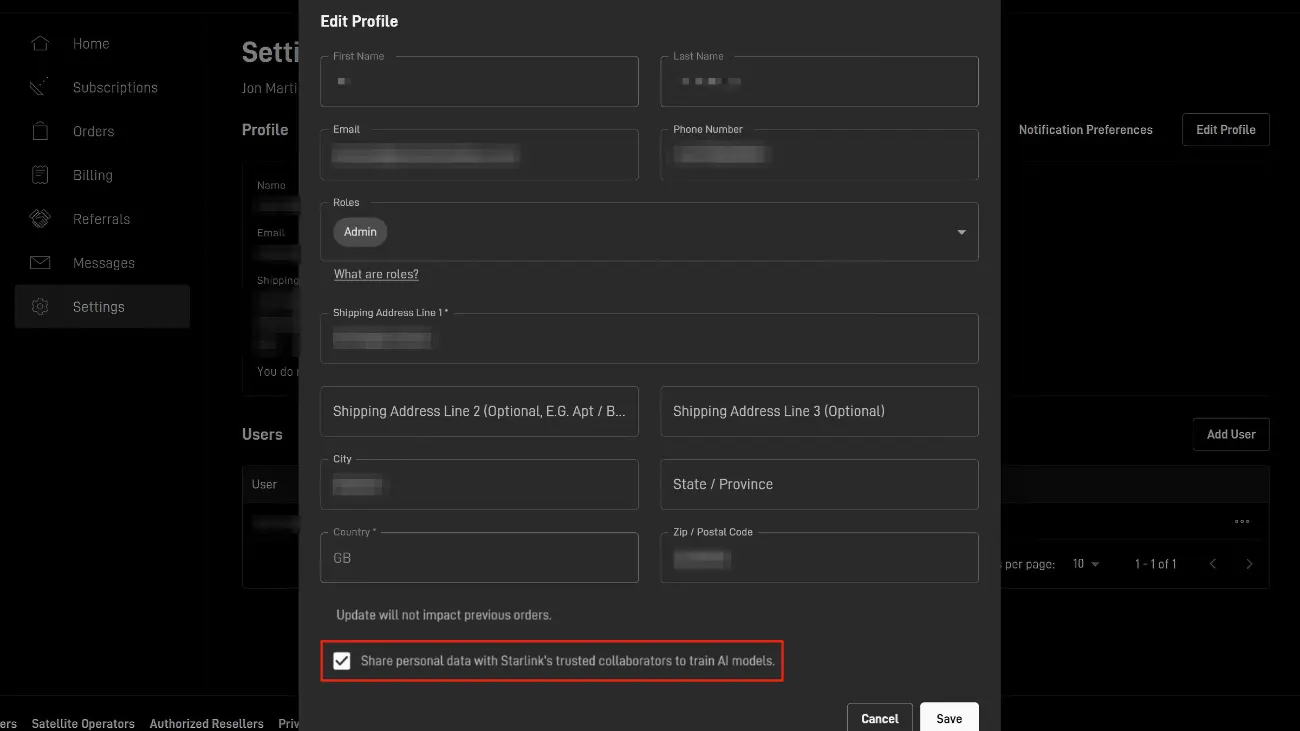
The process is straightforward, but keep in mind that Starlink requires two-step verification to save any privacy setting changes. When you toggle the AI training option off, you’ll be prompted to enter a passcode sent to your registered email or phone number before the change actually saves.
- Go to Starlink.com and open your account page.
- Click Edit Profile.
- Uncheck “Share personal data with Starlink’s trusted collaborators to train AI models”.

- Enter the verification code sent to your email or phone to confirm.
- Go back to the same screen to make sure the change has been successfully applied and saved.
Should You Use a VPN Too?
Opting out of the AI toggle is not the same as protecting your browsing activity. Since Starlink can see your DNS queries and metadata, even if not your actual page content, a VPN adds a meaningful extra layer by encrypting your traffic before it leaves your device. Your ISP then only sees an encrypted connection to a VPN server, nothing else.
This matters even more in certain regions. In the UK, ISPs are legally required to store browsing metadata for up to 12 months under the Investigatory Powers Act. Similar laws exist across the EU and Australia.
What to look for in a VPN: an independently audited no-logs policy, and solid performance on satellite connections, which already carry some latency.
Here are the ones worth considering:
- NordVPN — Top pick for Starlink. Fast, audited no-logs policy, and their NordLynx protocol handles satellite latency well.
- Surfshark — Best for families. One subscription covers every device in your house.
- ExpressVPN — Best for reliability. It’s the “set it and forget it” option with high-end encryption.
For more on how ISP-level tracking works in practice, this piece on why illegal IPTV streams are riskier than they look is worth a read.
Common Questions Answered
Does Starlink track your data?
Yes, but not in the way most people assume. Starlink can see your DNS queries (which domains you connect to) and connection metadata. They cannot see the actual content of your browsing since over 95% of the web uses HTTPS. That said, Starlink encrypts the connection between your dish and their satellites, but that only protects you from outside attackers, not from Starlink itself. A VPN is the only thing that hides your activity from your ISP.
Does opting out actually do anything?
Yes, it stops Starlink from using your data for AI training and sharing it with third parties for that purpose. It doesn’t affect data collected for network operations or legal compliance requests.
Does Starlink share data with law enforcement?
Yes, like all ISPs, Starlink complies with valid warrants and subpoenas. Opting out of AI data training has no bearing on this — they are completely separate obligations.
Do I need a VPN if I already opted out?
They solve different problems. The toggle stops one specific data use. A VPN prevents your ISP from seeing your browsing metadata entirely. Both are worth doing if privacy matters to you.
Does Starlink sell your data?
They share it with third-party partners for their own independent use. Whether that counts as “selling” is a legal distinction, but functionally, it’s close enough to matter.